Contact us
About us
Payneteasy is a leading payment platform provider. Our state-of-the-art technologies and multiple layers of flexibility boost the fastest and most efficient integration and customization.
Technologies
Payneteasy wants to make sure that every legit transaction through the gateway turns into profit. It takes an array of features to make that happen, and by white labeling the Payneteasy solution, you have immediate access to them all!

Learn more

Business type
Our clients have advantage with the full-fledged FinTech tools. Payneteasy offers technological processing solutions for different payment industry players and large-scale online businesses.
Events

Meet us at conferences around the world

SBC Summit Malta

SBC Summit Malta

29-30 April, 2026 St. Julian's, Malta
iGB L!VE London

iGB L!VE London

1-2 July, 2026 London, UK
SBC Summit Lisbon

SBC Summit Lisbon

29 Sep-1 Oct, 2026 Lisbon, Portugal
SiGMA Europe

SiGMA Europe

2–5 Nov, 2026 Rome, Italy
View all Upcoming Events

Customer Management System for Payneteasy Merchants

Manage your customers in one place. Use customer tiers with configured limits, risk rules, and routing logic — without custom code.

CMS is a CRM-style module inside the Payneteasy platform. Group customers into tiers, attach payment behaviour to each tier, and apply it automatically at transaction time. Configured by your Payneteasy account manager.

Talk to sales See how it works
Used by White Label partners and high-risk merchants on Payneteasy gateway

The problem we solve

Most payment gateways treat all customers the same. One set of limits. One routing logic. One risk profile. The result: VIP customers hit the same caps as anonymous traffic, fraud rules block legitimate high-volume buyers, and merchants build custom code outside the gateway just to keep their best customers from churning.

Manual workarounds outside the gateway for VIP exceptions

Hard-coded per-customer rules scattered across the integration layer

No way to A/B test routing strategy by customer segment

High-risk verticals (gaming, forex, adult, nutra) need granular tiering by KYC level — most gateways do not provide it natively

What Customer Management System is

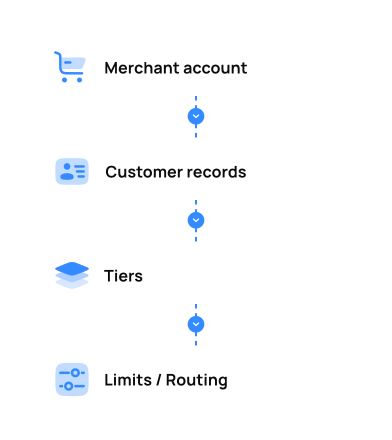
Customer Management System (CMS) is a merchant-level module on the Payneteasy platform — a payment-aware customer registry. Tiers (e.g. New, Verified, VIP, Restricted) are set up by your Payneteasy account manager based on the merchant's business requirements. Tier assignments come from the merchant — either set up manually together with the account manager, or sent in real time through the API — and CMS applies the configured per-tier limits and routing logic automatically at transaction time.

CMS operates at the customer level, not the merchant level. Segmentation is per individual customer record inside one merchant account; we do not segment merchants themselves.

Two ways CMS works

Customer Management System supports two operating modes — pick the one that matches how the merchant already manages its customer base.

Payment Gateway mode — Payneteasy holds the customer base

Customers are created and stored on the Payneteasy side. Every transaction references our internal customer ID. Tiers, limits, and routing logic are tied to that record, and the merchant relies on CMS as the customer registry. Tier definitions and assignments are set up by your Payneteasy account manager based on the merchant's business requirements.

Best fit: merchants that need a payment-aware customer registry but don't run their own CRM.

CRM/API mode — merchant's customer base drives the system

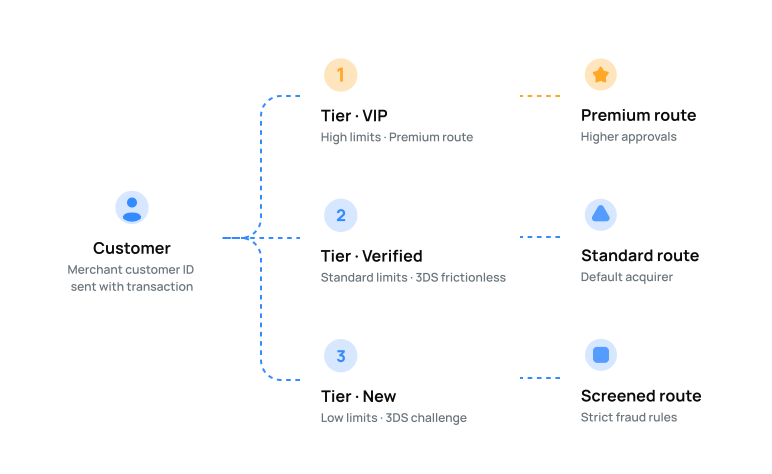
The merchant sends each transaction with its own merchant customer ID. CMS creates the customer record on first contact and routes accordingly. On every subsequent request, fields the merchant sends — including the tier — overwrite the stored values, so the merchant's CRM stays the source of truth and CMS reflects it in real time. CMS does not decide tier movement on its own; it applies whatever the merchant provides.

Best fit: merchants with a mature CRM who want CMS to mirror their existing segmentation without manual sync.

Core capabilities

CapabilityWhat it does
Customer tiersUnlimited tiers per merchant account. Tier definitions are configured by your Payneteasy account manager based on the merchant's business requirements. Tier assignments come from the merchant — set manually together with the account manager, or sent in real time through the API on each transaction.
Per-tier limitsDaily, weekly, monthly transaction caps and min/max ticket size — per tier, per currency.
Per-tier limitsDaily, weekly, and monthly limits on customer ID usage, by transaction count and total amount.
Routing logic per tierEach tier defines which acquiring route is preferred. VIP customers can be sent to a premium acquirer with higher approval rates; new customers can be sent to a route with stricter fraud screening.
Per-currency configurationRules are configured per currency. CMS only operates on currencies already enabled on the merchant account.
Important — per-currency scope: CMS only operates on currencies already enabled on the merchant account. Currency activation is handled separately by the Payneteasy account manager and is a prerequisite for any per-currency tier rule.

How it works — configuration flow

CMS is configured by your Payneteasy account manager on the platform side, based on the merchant's business requirements. The merchant defines the rules; the platform team applies them. The configuration screens are not exposed to merchants directly.

1
Define tiersThe merchant lists the tiers it needs (e.g. New, Verified, VIP, Restricted). Each tier becomes a label with attached configuration.
2
Assign customers to tiersTwo options: manual assignment per customer (configured together with the Payneteasy account manager), or — in CRM/API mode — the merchant sends the tier value in the transaction request, together with the merchant customer ID, and CMS overwrites the stored value automatically. CMS does not decide tier movement on its own; it applies whatever the merchant sends or what has been configured on the platform side.
3
Configure limits per tierSet daily, weekly, and monthly limits on customer ID usage, by transaction count and total amount. Configuration is handled by your Payneteasy account manager. Other risk filters (geo, BIN, 3-D Secure) are defined at the project level, outside CMS.
4
Configure routing logic per tierMap each tier to a preferred acquiring route. Configured by your Payneteasy account manager. Once live, routing is applied automatically at transaction time.
5
ActivateOnce configured on the platform side, changes take effect immediately for new transactions. Existing customer assignments persist until changed.

Use cases

Three patterns we see most often among PSP partners and direct merchants on the platform.

VIP customer routing

Goal: send your best customers through a premium acquiring route with higher approval rates and looser frequency limits, without giving the same treatment to anonymous traffic.

  • Step 1. Define a VIP tier together with your Payneteasy account manager.
  • Step 2. Configure the VIP tier on the platform side: higher daily / weekly / monthly per-tier limits on customer ID usage.
  • Step 3. Set routing logic for the VIP tier — point it to the premium acquirer route.
  • Step 4. Provide the VIP customer list to CMS — either through a one-time setup with the account manager, or by sending the VIP tier value with the customer's transactions in CRM/API mode.
  • Step 5. The next transaction from a VIP-tier customer goes through the configured route automatically.

New customer screening

Goal: route first-time customers through a stricter risk profile and a route optimised for fraud screening, then move them to a less restrictive tier once the merchant considers them verified.

  • Step 1. Define a «New» tier on the platform side with tight per-tier limits on customer ID usage.
  • Step 2. Route the «New» tier to an acquirer optimised for fraud screening.
  • Step 3. First-time customers are assigned to a configurable default tier, defined during onboarding or passed with the first transaction in CRM/API mode.
  • Step 4. When the merchant decides a customer is verified (per its own business logic — e.g. successful KYC, verified history, manual review), it sends an updated tier value via API, or asks the account manager to update it. CMS overwrites the customer record and applies the new tier's limits and routing on the next transaction. CMS itself does not promote customers between tiers.

Regional / per-currency segmentation

Goal: apply different routing and limits to customers transacting in different currencies.

Once a currency is enabled on the merchant account, Payneteasy can configure per-currency per-tier limits and routing logic for each tier independently. Currency activation itself is a prerequisite step handled by the Payneteasy account manager — see the note above.

Who Customer Management System is built for

PSPs & acquirers

Using Payneteasy as a White Label gateway and offering their merchants a customer-segmentation tool without building it themselves.

White Label partners

Running their own brand on top of Payneteasy infrastructure with full per-tier control configured on the platform side by the account manager.

Large direct merchants

E-commerce platforms with VIP programmes, marketplaces, subscription products with multiple tiers of paying users.

High-risk verticals

Gaming, forex, adult, nutraceuticals — granular per-customer routing and risk control as a regulatory and business necessity.

Why CMS on Payneteasy

Native module

No third-party integration, no extra latency. Configured on the Payneteasy platform side by your account manager based on the merchant's business requirements.

Routing at gateway level

Routing logic per tier is applied at the gateway, before the transaction reaches the acquirer.

No code required

Granular per-customer control without writing code or maintaining a separate rules engine.

B2B2C ready

White Label partners get the module out of the box for their merchants.

Two integration modes

Payment Gateway mode (we hold the customer base) or CRM/API mode (the merchant's CRM is the source of truth, CMS mirrors it on every transaction).

Technology platform

Payneteasy is a technology platform, not a financial institution — you keep your acquiring relationships, we provide the orchestration layer.

Frequently Asked Questions

Is CMS the same as a CRM?

CMS borrows the CRM idea of grouping customers into managed segments, but its purpose is payment behaviour — limits, risk rules, and routing logic per tier. It is not a marketing CRM and does not replace one.

Does CMS segment merchants or customers?

Customers, not merchants. Each merchant on Payneteasy has its own CMS instance and configures tiers for its own customer base.

Can I configure rules for a currency that is not yet on my account?

No. CMS works only with currencies already enabled on the merchant account. Add the currency at the merchant level first (through your Payneteasy account manager), then configure tier rules for it.

Do customers see which tier they belong to?

No. Tiers are an internal merchant-side configuration. Customers see only the standard checkout experience.

Who configures CMS — the merchant or Payneteasy?

Configuration is done by your Payneteasy account manager on the platform side, based on the merchant's business requirements. The merchant defines the business logic (which tiers, what limits, which routes); the platform team applies it. The configuration screens are not exposed to merchants directly.

What is the difference between Payment Gateway mode and CRM/API mode?

Payment Gateway mode: customers are created and stored on the Payneteasy side; transactions reference our internal customer ID. CRM/API mode: the merchant sends each transaction with its own merchant customer ID; the system creates the customer record on first contact and updates fields (including the tier) on every subsequent request — so the merchant's CRM stays the source of truth. CMS does not decide tier movement on its own; it applies whatever the merchant sends or what the Payneteasy account manager has configured.

What kind of risk rules can CMS apply per tier?

Inside CMS, the per-tier control is per-tier limits on customer ID usage — separate daily, weekly, and monthly caps, each measured by transaction count and total amount. Other risk filters (velocity, geo, BIN, 3-D Secure preference) are configured at the project level outside CMS.

Stop treating every customer the same.

See how Customer Management System fits into your Payneteasy setup. We will walk you through tier configuration, routing logic per tier, and the cases that match your vertical.

Payneteasy uses cookies to improve its performance
and enhance your user experience.