


Hosted Fields: keep your checkout, keep card data out of your systems
Accept cards directly on your own checkout page, while raw card data is collected directly by Payneteasy instead of your systems.
28.09.2026
6 min read
Meet us at conferences around the world

SiGMA Europe
Accept cards directly on your own checkout page, while raw card data is collected directly by Payneteasy instead of your systems.
You have spent time getting your checkout right. The layout, the wording, the order of the fields, the light and dark themes — all of it tuned to the way your payers actually behave. Then compliance enters the room. The moment your page handles a raw card number, that page, its JavaScript and your backend become part of the PCI DSS scope you have to manage. The usual escape is a hosted payment page: you send the payer to a page you don’t control, and the checkout you designed disappears at the most sensitive step.
Hosted Fields removes that trade-off. You keep your checkout. Your page code and backend never receive the raw card data.
Hosted Fields lets you build the payment form on your own site and drop the sensitive card inputs into it as fields served by Payneteasy. Three fields — card number, expiry date and CVV — are each loaded as a separate, cross-origin iframe from the Payneteasy domain. Everything around them — name, email, cardholder name, your headings, your “Pay” button — stays yours.
To the payer, it looks and behaves like a single form. Technically, the three card fields are isolated: their contents live in Payneteasy-origin iframes that your page code cannot read, so the card number, expiry and CVV never enter your page’s DOM or JavaScript, the requests to your server, or your logs. That isolation also keeps card data away from the third-party scripts on your page — analytics, tag managers, chat widgets — which on a regular form have the same access to the inputs as your own code does.
You control the placement, spacing, borders, backgrounds and field containers with your regular CSS. The inputs inside the hosted fields are styled through the Hosted Fields SDK, so they match the rest of your checkout — including light and dark themes.
The screenshots below show the same checkout in light and dark themes: when you switch the theme, the card number, MM/YY and CVV fields are restyled to match the rest of the form, instead of standing out as a foreign block.
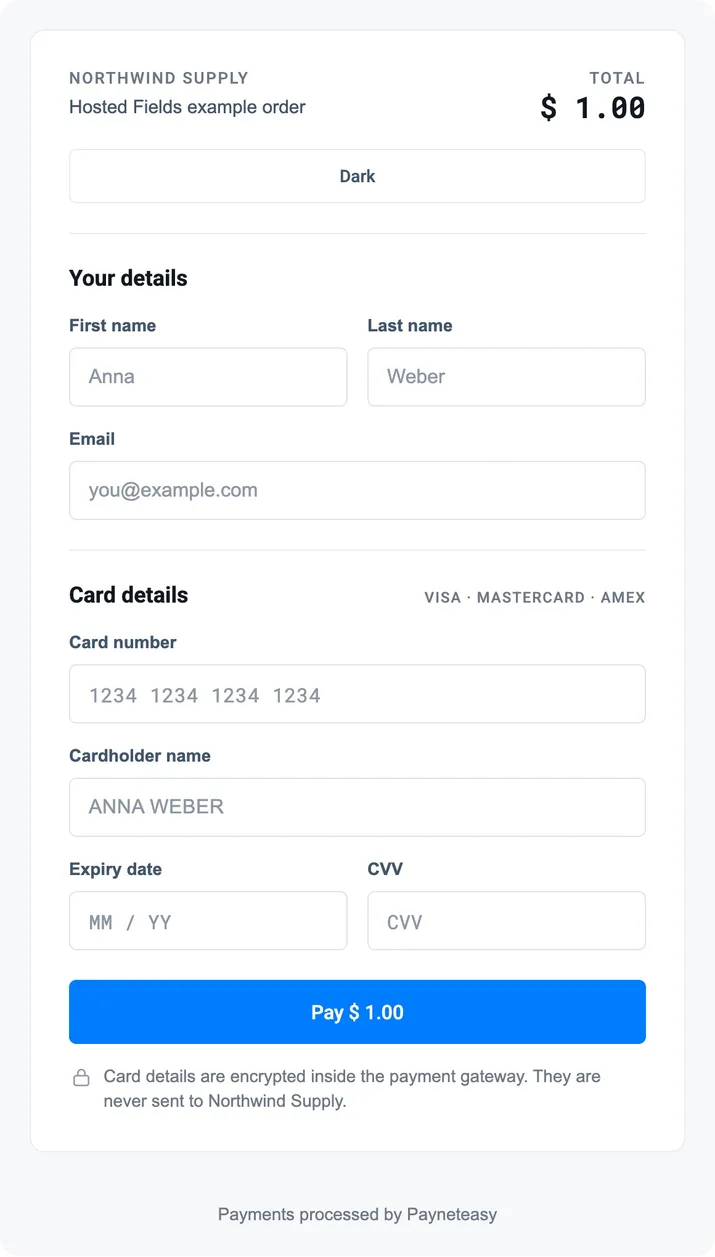
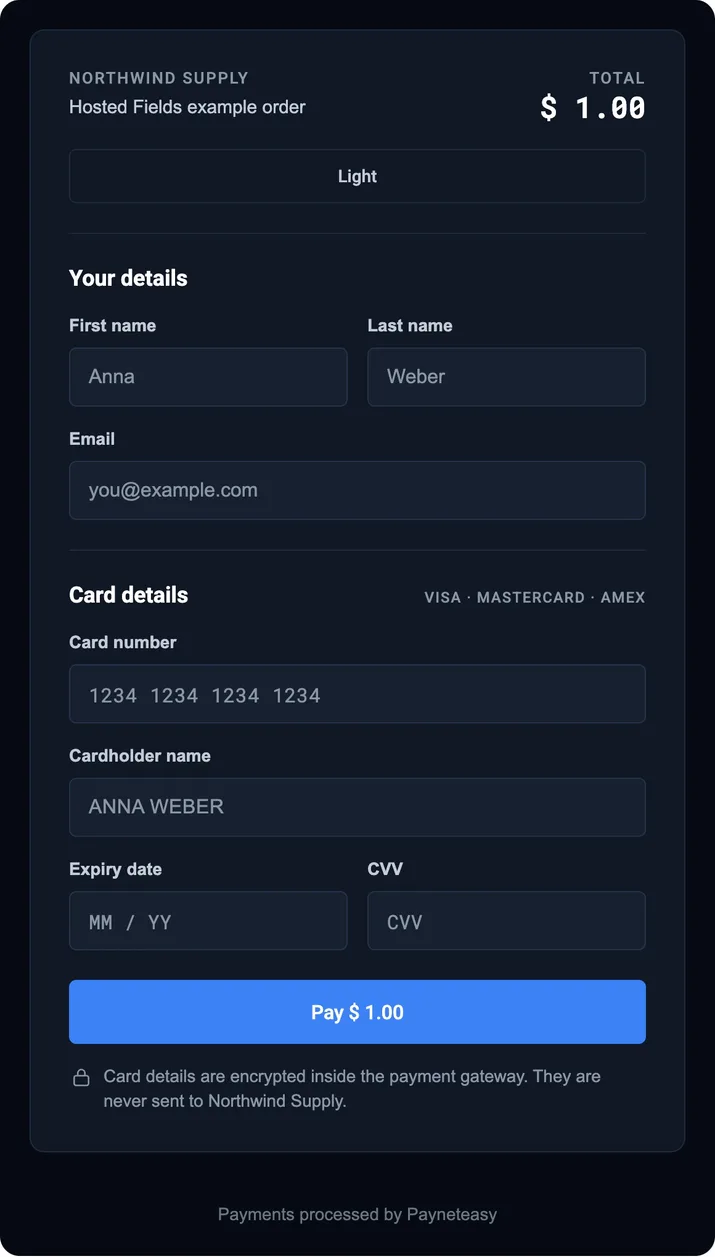
The most sensitive step of checkout stays on your page, in your brand, with the UX you have already optimised. No redirect at the moment the card is entered, no unfamiliar page, no lost context.
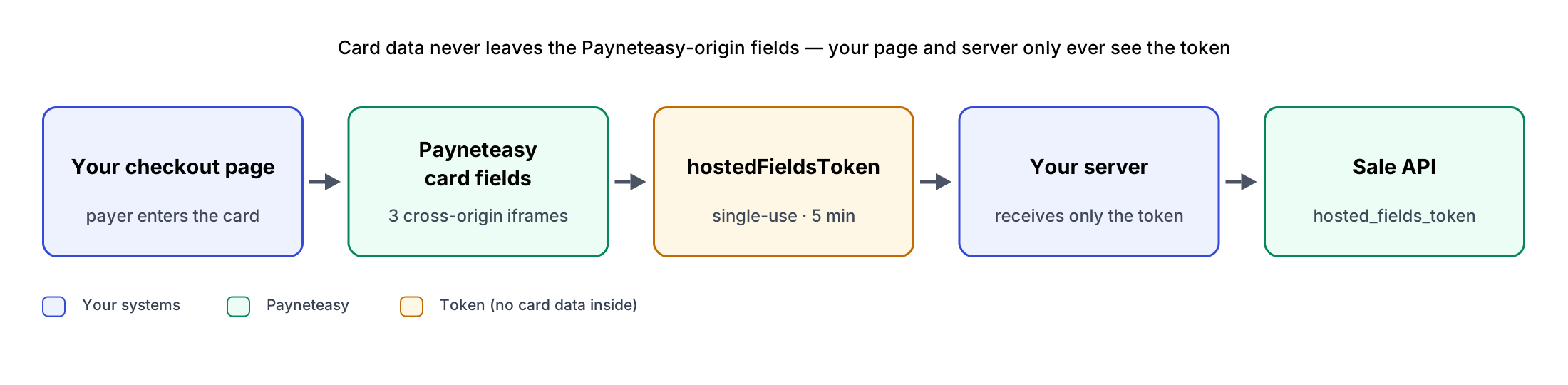
ephemeralTicket from Payneteasy and places it on the checkout page. The ticket lives for 15 minutes and authorises exactly one tokenization attempt. Your private RSA signing key stays on your server and never reaches the browser — only the ticket does.hostedFieldsToken — a single-use token, valid for 5 minutes, that stands in for the card details in the next request. Your page code never sees the raw card data, only this token.hostedFieldsToken to the Sale (or Preauth) API in place of the card parameters.The two objects do different jobs:
On the payment API side, the change is small: four card parameters (credit_card_number, expire_month, expire_year, cvv2) are replaced by one hosted_fields_token. The other Sale parameters stay the same. The token is accepted by Sale and Preauth (and, for deposit-to-card transfers, for the receiving card).
The basic front-end setup starts with one script tag and one SDK initialization:
<!-- sandbox or production host, see the integration guide -->
<script src="https://GATEWAY_HOST/assets/libs/hosted-fields/latest/index.js"></script>

const sdk = HostedFields.init({
  endpointId: ENDPOINT_ID,
  fields: {
    cardNumber: { type: 'pan', placeholder: '1234 1234 1234 1234' },
    expiryDate: { type: 'exp' },
    cvv:        { type: 'cvv' }
  },
  onReady: () => { payButton.disabled = false; },
  onToken: token => sendToYourServer({ hosted_fields_token: token }),
  onError: error => showError(error.payerMessage)
});

payButton.addEventListener('click', () => sdk.tokenize(EPHEMERAL_TICKET));
cardNumber, expiryDate and cvv are the ids of empty <div> elements in your markup; the SDK creates a Payneteasy-origin iframe inside each. You style the containers with your own CSS and pass input styles through the SDK; the SDK toggles hf-field--focus, hf-field--filled and hf-field--error on the containers so your CSS can react to what happens inside the iframe.
Load the SDK with a plain <script> tag straight from the Payneteasy domain — it is not an npm package, and it must not be self-hosted: a copy served from your site would create the fields on your own origin, the very thing Hosted Fields exists to avoid, and init refuses to start. If your page sets a Content Security Policy, allow the Payneteasy domain in script-src and frame-src.
Hosted Fields changes how the card is collected, not how the payment is authenticated. When the issuer requires a 3-D Secure challenge, the order status response carries it as a URL or as ready-to-render HTML, and you decide how to show it: render it in an iframe inside your checkout so the payer never leaves your page, or redirect to it and return. Authentication itself runs through Payneteasy’s 3DS Adapter, exactly as in a server-to-server integration.
Card data collection is isolated from your website by design. The card fields live in iframes served from the Payneteasy domain, so the raw card details are captured by Payneteasy — not by your page, your server calls or your logs. Payneteasy handles the card data inside its PCI DSS Level 1 Service Provider environment, while your systems work only with the token.
That isolation is what reduces the PCI DSS scope you have to defend and evidence: you still run the checkout your customers see, but you stop handling raw card data on it.
Hosted Fields reduces PCI DSS scope; it does not remove PCI DSS obligations altogether. The SAQ and controls applicable to a particular merchant depend on the overall integration and should be confirmed with the merchant’s acquirer or QSA.
If you run a white-label installation of the Payneteasy platform, Hosted Fields is available to your merchants on the same terms. The SDK and the card fields are served under your installation’s own domain, and every ticket and token is bound to that installation — a ticket issued on one installation is rejected on another. Your merchants get the same integration guide and the same reference examples, and their card data stays inside your PCI DSS perimeter rather than theirs.
hosted_fields_token; the rest of your Sale request stays the same.Hosted Fields is now available in both sandbox and production. Ask your account manager to enable it for your endpoints, then start with the integration guide or one of the reference implementations.
Thank you for reaching us. Your request has been sent successfully. We will get back to you as soon as possible.
Message was not sent