Contact us
About us
Payneteasy is a leading payment platform provider. Our state-of-the-art technologies and multiple layers of flexibility boost the fastest and most efficient integration and customization.
Business type
Our clients have advantage with the full-fledged FinTech tools. Payneteasy offers technological processing solutions for different payment industry players and large-scale online businesses.
Events

Meet us at conferences around the world

iGB L!VE London

iGB L!VE London

1-2 July, 2026 London, UK
SBC Summit Lisbon

SBC Summit Lisbon

29 Sep-1 Oct, 2026 Lisbon, Portugal
SiGMA Europe

SiGMA Europe

2–5 Nov, 2026 Rome, Italy
View all Upcoming Events

Payneteasy MCP for Payment Platform

Give your payment team read-only access to Payneteasy backoffice data — without AI control over payment flows.

Payneteasy MCP connects MCP-capable assistants to the read side of your payment platform. Teams can ask plain-language questions about transaction statistics, individual orders and platform records — merchants, projects, endpoints, gates and processors — while access remains scoped and revocable.

Contact sales MCP Documentation
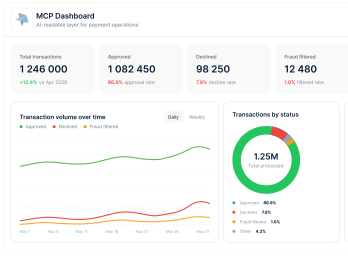
Payneteasy MCP dashboard — an AI-readable read-only layer showing transaction totals, volume over time, status breakdown and top processors
What it is

What Payneteasy MCP Is

Payneteasy MCP is a read-only layer that connects AI agents to operational data inside the Payneteasy payment platform.

Built on the Model Context Protocol, it allows an MCP-capable assistant to discover what platform data it can read and answer operational questions through one common interface.

In the Payneteasy backoffice, MCP exposes only the read side of the platform: transaction statistics, order lookup, and merchant, project, endpoint, gate and processor records. It is built for reading and reporting, not for moving money.

The agent can read and report. It cannot authorise, capture, refund, move money, or change platform settings.

Why it matters

Why Payment Teams
Need This

Payment operations teams work with a large amount of operational data: approval rates, decline reasons, transaction volumes, fraud ratios, chargeback indicators, routing paths, merchant records, processor performance and individual order histories.

Finding the answer often means switching between dashboards, filtering reports, exporting data and manually matching IDs across the backoffice.

AI Agent Access to Payment Operations Data

With Payneteasy MCP, an assistant can answer practical payment operations questions in plain language.

Payment AI Assistant interface — a chat answering an operational question about a declined payment with status, reason, route and stage
In practice

How Teams Use It

Operational Teams

Q

Show approved, declined and fraud-filtered transaction volume for this merchant this month.

A

The assistant returns a structured performance summary with totals, ratios and trend movement over the selected period.

Risk and Fraud Teams

Q

What were the top decline and fraud reasons for this merchant last month?

A

The assistant groups the data by reason, status, issuer country, card type or other available operational dimensions, helping the team identify patterns faster.

Support and Account Teams

Q

Find the failed order for this invoice and explain what happened.

A

The assistant finds the matching order, shows its status, decline reason, routing path and processing trail, and explains where the payment failed.

Capabilities

Key Capabilities
and Example Questions

01

Transaction Analytics and Performance Monitoring

Use AI agent payment operations queries to understand transaction activity without building manual reports.

Payneteasy MCP can help read
  • Transaction summaries for selected date ranges
  • Sales, reversals, chargebacks, frauds and disputes
  • Breakdowns by card type, country, status and reason
  • Time series by day, week or month
  • Approved vs declined volume
  • Counts, amounts and ratios
  • Decline, fraud and chargeback reason analysis
  • Top merchants, companies or processors by metric
Example: Transaction Analytics and Performance Monitoring

02

Order Investigation and Decline Analysis

Sometimes a team does not need a full report. It needs to understand one transaction. Payneteasy MCP helps an AI assistant find individual orders, read safe order details, check status, routing path and processing trail. The agent can explain where a payment progressed or stopped — without raw card data and without payment actions.

The assistant can read
  • Safe order summaries
  • Fraud and error flags
  • Card metadata
  • Order status and amount details
  • Step-by-step order logs and processing trail.
  • Routing across endpoint, gate, processor and project
Example: Order Investigation and Decline Analysis

03

Platform Reference Data and Configuration Navigation

Payment operations often depend on the configuration behind the transaction. Payneteasy MCP lets an AI assistant read platform records such as merchants, projects, endpoints, gates and processors. The pattern is safe and read-only: search → resolve → read. The assistant can explain configuration links, but cannot change settings.

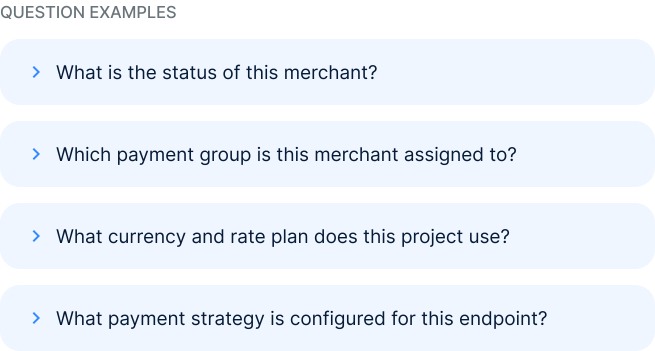
Example: Platform Reference Data and Configuration Navigation
Reference data path: Merchant → Project → Endpoint → Gate → Processor Reference data path: Merchant → Project → Endpoint → Gate → Processor
Security boundary

Built for Safe Read-Only Access

Payneteasy MCP is designed around a clear security boundary: AI agents can read operational data, but they cannot perform payment actions.

Read-Only by Design

Every available tool is read-only. The assistant can query statistics, read order information and review platform configuration. It cannot authorise, capture, refund, move money or change settings. It reports. It does not operate payment flows.

No Raw Card Data

Payneteasy MCP does not expose raw card data to the assistant. The read layer deals with aggregates, configuration, statuses, routing data, card metadata and operational records. It does not return PAN, CVV or raw PCI cardholder data into the AI assistant context.

Token-Governed Access

Access is controlled through a scoped token. The token defines what read-only tools and data the assistant can access. It can also be revoked, helping teams control AI access to operational payment data without turning an experiment into uncontrolled access.

How It Works

01

Connect the Agent

An MCP-capable assistant connects to the Payneteasy MCP server with a scoped token. This gives the assistant access only to the read-only tools allowed by that token.

02

Discover Available Read-Only Tools

The MCP server advertises the questions it can answer. These can include transaction statistics, order lookup and platform reference data such as merchants, projects, endpoints, gates and processors.

03

Ask Questions in Plain Language

The team asks operational questions in natural language. The assistant resolves names to IDs where needed, queries the allowed read-only data and returns a clear answer based on Payneteasy backoffice information.

Who it's for

Who Payneteasy MCP Is For

Payneteasy MCP is designed for teams that need better access to operational payment data without giving AI agents control over payment actions.

PSPs and payment service providersFintech platformsPayment operations teamsRisk and fraud teamsSupport and account management teamsPayment analystsPlatform teams working with Payneteasy backofficeCompanies preparing for agent-native operational workflows

Where MCP Fits in the Payneteasy Platform

Payneteasy MCP is a read-only layer for operational backoffice data. It is not a payment automation tool, not a gateway replacement and does not move money or expose raw card data.

The Payneteasy white-label gateway is a separate product for running payment services under your own brand. MCP focuses only on safe, machine-readable, read-only access to payment operations data and related platform entities.

Payneteasy is a technology platform, not a bank or payment facilitator

Frequently Asked Questions

What is Payneteasy MCP?

Payneteasy MCP is a read-only layer that allows AI agents to query operational data from the Payneteasy backoffice through the Model Context Protocol. It helps assistants answer questions about transaction statistics, individual orders and platform reference data.

What can an AI agent read?

An AI agent can read transaction analytics, order information and platform reference data. This can include approved and declined transaction volumes, sales, reversals, chargebacks, frauds, disputes, ratios, order statuses, routing data, processing logs, merchants, projects, endpoints, gates and processors.

Can the AI agent move money?

No. Payneteasy MCP is read-only. The agent can report and analyse, but it cannot authorise, capture, refund, move money or change settings.

Does Payneteasy MCP expose cardholder data?

Payneteasy MCP does not expose raw card data such as PAN or CVV. The read layer works with aggregates, operational records, card metadata and platform reference data without returning raw card numbers into the AI assistant context.

How is access controlled?

Access is governed by a scoped token. The token defines what read-only tools and data the assistant can access and can be revoked when needed, helping teams keep AI access controlled.

Is MCP the same as the Payneteasy white-label gateway?

No. The white-label gateway is a separate product for running payment services under your own brand. MCP is a read-only access layer that helps query operational backoffice data.

Who should use Payneteasy MCP?

Payneteasy MCP is useful for PSPs, fintech platforms, payment operations teams, risk and fraud teams, analysts and platform teams that need faster access to operational payment data while keeping AI access read-only and controlled.

Give Your Team a Safer Way to Query Payment Operations Data

Connect AI agents to the read side of your Payneteasy backoffice and help teams access transaction analytics, order trails and platform records through plain-language questions.

Request MCP Access Book a Demo