Contact us
About us
Payneteasy is a leading payment platform provider. Our state-of-the-art technologies and multiple layers of flexibility boost the fastest and most efficient integration and customization.
Business type
Our clients have advantage with the full-fledged FinTech tools. Payneteasy offers technological processing solutions for different payment industry players and large-scale online businesses.
Events

Meet us at conferences around the world

SBC Summit Lisbon

SBC Summit Lisbon

29 Sep-1 Oct, 2026 Lisbon, Portugal
SiGMA Europe

SiGMA Europe

2–5 Nov, 2026 Rome, Italy
View all Upcoming Events

Payneteasy adds auto-leveling to its Customer Management System

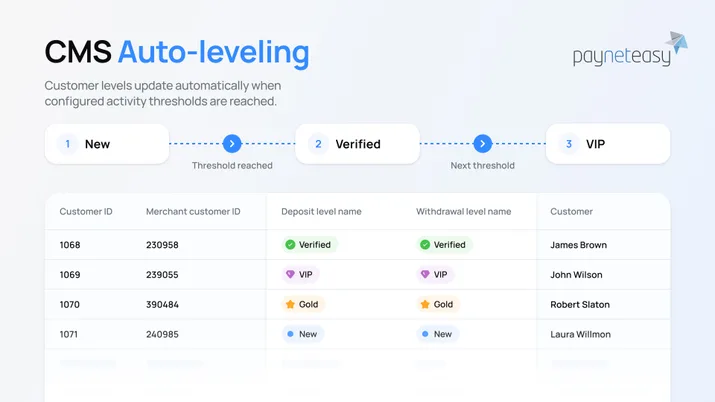
Auto-leveling in Payneteasy CMS changes customer levels automatically, resets progress on each change, and routes deposits and withdrawals per level.
31.08.2026
2 min read
Table of contents
  1. What CMS is
  2. Auto-leveling
  3. Also in this release
Do you have a question?
Contact author
Do you have a question?
Contact author

Payneteasy CMS auto-leveling: customer levels update automatically when configured activity thresholds are reached

Payneteasy has added auto-leveling to its Customer Management System (CMS): payment providers can now move customers between levels automatically — and apply the right deposit and withdrawal handling to each level — without reassigning anyone by hand.

What CMS is

CMS is a merchant-level module inside the Payneteasy payment gateway — a payment-aware customer registry. It lets a provider sort customers into levels (New, Verified, VIP, Restricted, and any labels you define) and apply different limits, risk rules, and routing to each level, right at the gateway and without custom code. Until now, every level assignment was a manual decision. Auto-leveling is what changes that.

Auto-leveling: segmentation that maintains itself

Auto-leveling moves a customer to a new level on its own, based on the thresholds you set, so segmentation keeps pace with real customer activity instead of waiting on an operator.

The feature ships with three parts:

  • Automatic level changes. A customer’s level updates as their activity crosses the thresholds you configure — no manual reassignment.
  • Manual level changes and an auto-leveling flag. You can still move a customer to another level manually, while participation in auto-leveling is controlled by a flag configured for the level.
  • Optional progress reset. When you remove a level from the auto-leveling chain, you can choose to carry over or reset the customer’s accumulated progress toward level thresholds.

Auto-leveling runs only in PNE (Payment Gateway) mode — where Payneteasy holds the customer records rather than an external CRM — and applies to both Deposits and Withdrawals. The result is customer segmentation that runs without manual intervention.

Also in this release

A set of supporting changes make levels easier to see, search, route, and monitor:

  • Client level field in transaction details — transaction details now include a dedicated field showing the customer’s level.
  • New search criteria on the Orders screen — search by Client level and Merchant client ID, so you can move between order details and a specific customer more directly.
  • Jump to level settings — open a level’s configuration straight from an individual customer’s settings.
  • Disable a currency without deleting it — turn a currency off within a level’s configuration instead of removing it and its whole setup.
  • Wider reporting — the transactional report and the order screen now include Client level and CMS trust level fields.
  • Consistent levels across Deposit and Withdrawal — renaming or deleting a level now applies to both directions at once.
  • New routing type: CMS Trust Level — route transactions by the customer’s CMS trust level.
  • “Show in form” reset on level creation — when you create a CMS level, you can reset the “Show in form” setting, applied when a customer’s level changes.
  • Five new monitoring filters for CMS buffers:
    • CMS buffer for level recalculate delay
    • CMS buffer for level recalculate queue
    • CMS buffer for merchant deletion
    • CMS buffer for update level delay
    • CMS buffer for update level queue

Together these extend CMS from a manual segmentation tool into one that keeps customer levels — and the deposits and withdrawals tied to them — current on its own.

Related technologies

Do you have a question?
Contact author